


Every fleet of cellular routers starts out in good shape. Devices are provisioned with the right firmware and configuration, and everything matches the plan. Then the fleet grows. New models are added, devices are replaced and urgent changes get made in the field. Over time, the fleet drifts from that standard, and this configuration drift makes router fleet management harder: identifying which devices are out of compliance across thousands of routers may require significant time and effort.
In our previous post on AirLink® Management Service (ALMS) Device Groups, we introduced Dynamic Groups, which allow administrators to organize large fleets around the way their organizations operate. Dynamic Groups also help control who can see and manage which devices. Using labels and other device attributes, administrators can create groups that reflect geography, department, use case, or router characteristics.
Dynamic Groups organize your fleet around your needs. Fleet Management Groups go a step further: they define the standard your devices should meet once, check a group against it and bring any device that has drifted back into line remotely.
What are Fleet Management Groups in ALMS?
Fleet Management Groups let administrators define firmware and configuration requirements once per group, check devices against those requirements and bring any drifted device back into compliance remotely.
For contrast, a utility might use Dynamic Groups to view all the devices associated with a particular region, application or asset class. The same router could appear in several of these groups because administrators need to view the fleet in different ways.
Fleet Management Groups provide a different lens. They bring together devices so administrators can manage them according to defined software and configuration requirements, set once per group rather than device by device. Each device belongs to one Fleet Management Group, giving administrators a consistent standard against which to check and manage it.
The two types of groups can work together. An AirLink XR60 router might appear in Dynamic Groups for Eastern Region and Substations while also belonging to a Fleet Management Group that sets the firmware and configuration requirements for it.
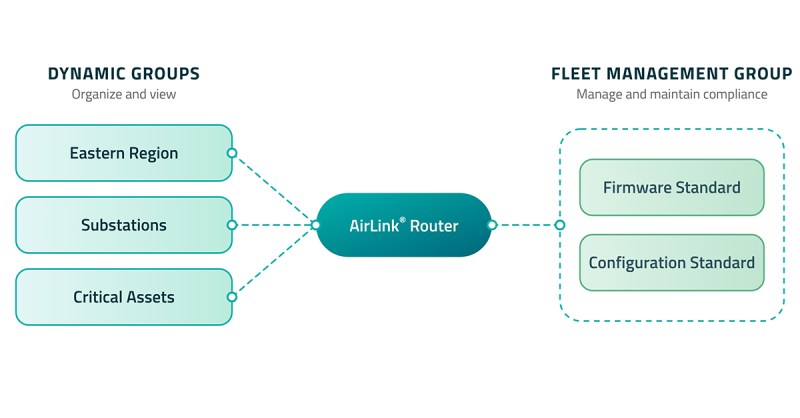
This router sits in three Dynamic Groups because administrators need to view it in different ways: by region, application or asset type. It belongs to just one Fleet Management Group, which sets the single firmware and configuration standard it’s measured against.
How Fleet Management Groups Help Detect and Correct Configuration Drift in Router Fleets
Within a Fleet Management Group, administrators can define rules that establish the software and configuration requirements devices should meet:
- Heartbeat: Set the required communication interval with ALMS for all device models in the group.
- Install firmware: Specify the firmware version each device model should be running.
- Apply template: Enforce the appropriate configuration template and settings for each model, with the option to reboot the device when the template is applied.
ALMS already supports workflows for configuring device communication, installing firmware and applying configuration templates. Fleet Management Groups bring those capabilities together in a group-based compliance process.
Rules are set by device model, so a single group can include different routers, each held to its own firmware and configuration standard. The same rules apply whether a group contains 50 routers or 5,000. As a group grows, administrators maintain one standard for it instead of tracking updates device by device.
Once the rules are in place, administrators can run a compliance check on a group. Results show each router’s heartbeat, firmware and configuration status against the group’s rules, so it’s clear which devices have drifted, and how. The group list shows each group’s compliance status and the result of its most recent rule application, so teams know where to look first. Administrators can then apply the group’s rules to bring devices back into line.
For organizations managing hundreds or thousands of geographically distributed devices, Fleet Management Groups provide a scalable way to answer one question: Is my fleet running the software and configuration I expect?
Maintaining Router Compliance While Keeping Administrators in Control
For mission-critical deployments, administrators need to control when changes happen. Compliance checks are initiated by the administrator rather than running continuously in the background. If the administrator finds that a device is out of compliance, they decide when to take corrective action.
That control matters. A firmware or configuration change may require a device reboot or temporarily affect communications. Administrators may need to coordinate changes around maintenance windows, operational requirements or other activities at the site.
Checking compliance and applying rules are separate actions. Administrators can review the results for a group first, then apply its rules when conditions allow. They can also choose whether a template change triggers a reboot, so changes can be timed around operational needs.
Automating compliance would mean constantly checking every device for drift and pushing changes whenever it appears. For cellular deployments, particularly large ones, avoiding unnecessary communications can help organizations manage data usage.
Fleet Management Groups combine the efficiency of defining standards and checking compliance group by group, with administrator control over when and where changes are applied.
Router Fleet Management Groups in Action: a Utility Example
Consider a utility operating a mix of fixed and mobile communications infrastructure.
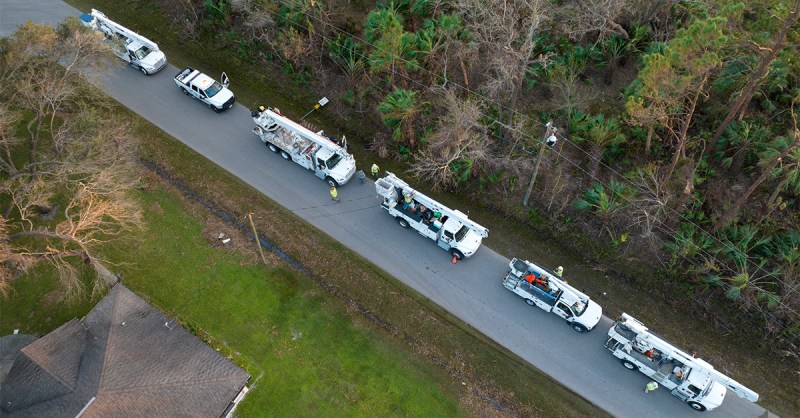
Its network might include routers supporting substations, reclosers and bank controllers alongside a mobile fleet of service vehicles. Different applications may use different AirLink router models, each with its own firmware and configuration requirements.
With Fleet Management Groups, the utility can establish requirements for the devices within each group, including model-specific rules where appropriate. For example, it might specify an approved firmware version and configuration template for AirLink RX400 routers connecting reclosers. The XR60 routers connecting its service vehicles could have a different set of requirements.
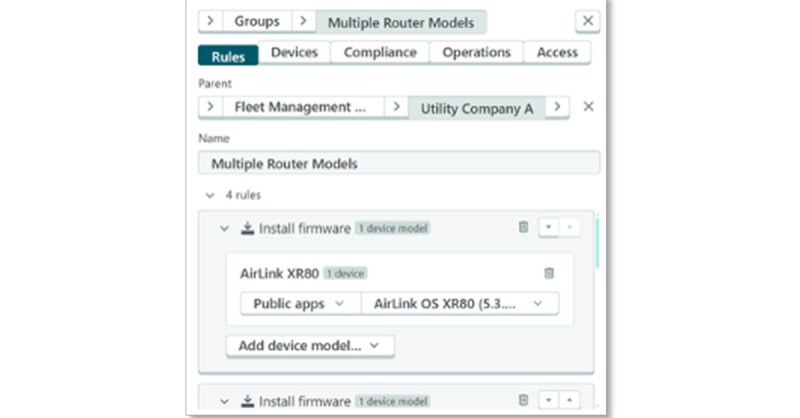
The result is one defined standard for each group of routers, with the ability to set rules before the devices even arrive. When the utility adds new reclosers next year, the requirements are already in place. The administrator applies the group’s rules, bringing the new routers to standard.
The administrator can then run a compliance check against the group. Instead of reviewing individual devices to determine whether each one meets the appropriate standard, the team runs a single compliance check, and ALMS identifies devices that are out of compliance.
The utility can review those results and apply the group’s rules when the timing is appropriate.
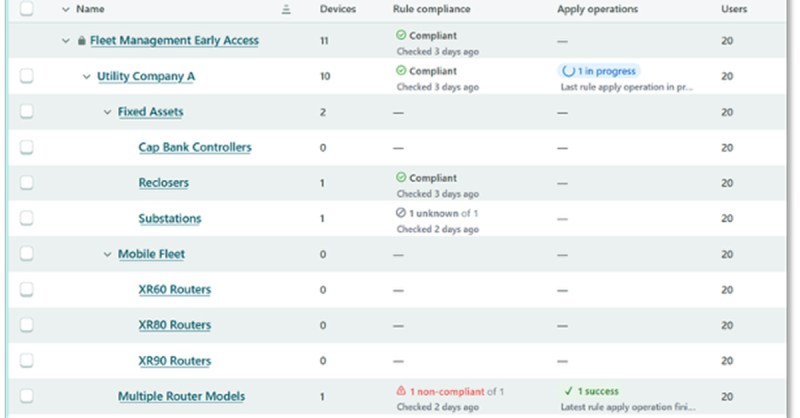
Because checks and changes happen group by group, a utility can bring the routers connecting its reclosers into line during one maintenance window and handle the routers in its service vehicles at a different time.
The benefits extend beyond operational efficiency. Maintaining approved firmware and configuration standards across deployed devices can also support an organization’s broader security and compliance practices. Knowing which devices have drifted from the intended state gives administrators an opportunity to address those exceptions before they persist across the fleet.
Benefits of ALMS Device Groups for Router Fleet Management
Together, Dynamic Groups and Fleet Management Groups give administrators four distinct benefits:
- Visibility (Dynamic Groups): View the fleet in ways that reflect how the organization operates, such as by region, application, department, asset class, or other business requirements.
- Access control (Dynamic Groups): Control which devices individual users can see and manage, reducing the risk of unauthorized or accidental changes.
- Consistency (Fleet Management Groups): Define firmware and configuration requirements once per group, then check compliance across every included device at once, even as the group grows.
- Compliance (Fleet Management Groups): Identify devices that have drifted from established firmware and configuration standards and bring them back into line when operational conditions allow.
Organize Your Router Fleet Your Way, Manage What Matters
Together, the Dynamic Groups and Fleet Management Groups approaches provide both the flexibility to understand a complex router fleet and a defined standard to manage it consistently as it grows.

Frequently Asked Questions
How is a Fleet Management Group different from a Dynamic Group?
Dynamic Groups organize and control access to devices by attributes such as region, application, label, or any combination of these. A router can belong to several Dynamic Groups. A Fleet Management Group sets the firmware and configuration standard for its devices, and each device belongs to only one Fleet Management Group.
Does ALMS check compliance and apply fixes automatically?
No. Administrators initiate compliance checks and decide when to apply rules, so changes can be timed to fit operational needs, such as maintenance windows.
How to get started with Fleet Management Groups in ALMS
Explore the ALMS documentation to learn how to create and use Fleet Management Groups or talk to an AirLink expert about your router fleet management requirements.
Semtech®, the Semtech logo and AirLink® are registered trademarks or service marks of Semtech Corporation or its affiliates. Other product or service names mentioned herein may be the trademarks of their respective owners.