


Managing connected devices at scale shouldn’t feel like managing chaos.
Yet for many organizations, that’s exactly what happens. As deployments grow from dozens to hundreds—or thousands—of devices, operations teams are forced into repetitive, device-by-device workflows that simply don’t scale. What once worked in a pilot environment quickly becomes inefficient and error-prone.
Device Groups in AirLink® Management Service (ALMS) are designed to solve this problem, bringing structure, visibility and control to large, distributed fleets.
What are Device Groups?
Device Groups in ALMS facilitate a simple but powerful shift: your fleet management platform mirrors how your organization operates. Administrators can organize AirLink routers into logical groups based on region, device type, firmware version, operational role, or any combination of these attributes—then view, manage and act on devices directly within that structure.
Groups can also be dynamic. When a device’s attributes change, for example with firmware updates, label changes or model swaps, group membership updates automatically to reflect it. Your fleet organization stays current without manual upkeep, so you always have an accurate picture of what’s actually deployed.
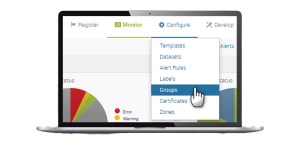
This matters because scale changes everything. A fleet of 10 devices can be managed manually. A fleet of 1,000 requires structure.
At that scale, organizations need to maintain visibility, control configurations, respond to issues remotely, and keep devices compliant with network and security expectations. Without a structured approach, those tasks become difficult to execute reliably across a large, distributed fleet.
What Device Groups Let You Do
- Your management platform mirrors your business structure. Groups support parent-child hierarchies, so a transit agency, for example, can mirror its true structure: depots as parent groups, individual bus routes as child groups, maintenance vehicles and supervisor trucks in their own collections. A utility can group by region, then by substation, then by asset class. Once that structure is in place, teams can manage and act on devices at the group level rather than one by one. And because a device can belong to more than one group simultaneously, your organizational structure and your operational structure don’t have to be the same thing — a router can live in both a regional group and a firmware tracking group at once.
- Update hundreds of devices in one operation, not hundreds of operations. You can apply firmware updates and configuration templates to an entire group in one operation. Instead of spending hours updating 500 devices individually, you filter to the relevant group, select and push. Devices in the group get updated simultaneously. You can also create a group filtered to devices not running the latest firmware — as each device upgrades, it drops out of the group automatically. When the group is empty, the rollout is done.
- Assign access based on responsibility. Role-based access is defined at the group level, supporting a least-privilege model that reduces the risk of unauthorized changes, prevents accidental cross-region actions and limits exposure to only the devices relevant to each user. A regional technician gets access to their devices and nothing else. A manager gets read only visibility into their area. A partner or reseller can be added as an administrator for just the customer accounts they manage.
- See exactly the slice of fleet that matters. By scoping dashboard widgets to a specific group, you can see connectivity status, data usage and signal strength for exactly the subset of devices you care about rather than the entire account.
- Grant cross-account visibility without cross-account control. As organizations centralize support through network operations center (NOCs), they often need to give staff or third-party partners visibility across multiple accounts without full administrative access. Device Groups partner access makes this possible, letting administrators assign users from partner companies to specific groups with role-appropriate permissions, from view only to full administration.
Why Device Groups Matter as Deployments Grow
As Internet of Things (IoT) deployments expand, the complexity of managing them grows even faster. Without a way to organize devices meaningfully, even routine tasks like updating firmware or troubleshooting connectivity require repeated filtering, manual selection and constant validation.
Device Groups eliminate that friction by making structure persistent. Instead of rebuilding filters every time, teams can define groups once and act on them consistently, reducing operational overhead, especially in environments where devices are distributed across regions, use cases or teams.
The impact goes beyond efficiency. When fleet organization reflects how the business operates, the right people gain access to the right devices without confusion or overlap. Group-level permissions support secure, role-based access while reducing the risk of unintended changes.
Just as importantly, Device Groups enable safer operations. Teams can test changes on a subset of devices before applying them more broadly, reducing the risk of large-scale disruptions.
What IoT Deployments Look Like in the Field
Consider a regional transit authority managing hundreds of in-vehicle AirLink routers across multiple bus routes, maintenance vehicles and supervisor trucks. Without Device Groups, every attempt to push a configuration update or scope a troubleshooting session would require manually re-filtering by labels, with no persistent structure carrying over between sessions.

With Device Groups, buses on Route 12 are a group. Maintenance vehicles at Depot North are a group. Supervisory vehicles are a group. A technician responsible for Depot North sees only Depot North. The same logic applies across multiple industries. A public safety agency can segment patrol cars, unmarked vehicles and command centers, with different bandwidth policies and VPN rules per group and can manage access based on officer role and seniority. Utilities can group remote substations by geography or asset class, and stage firmware rollouts to a test group before pushing to production. Oil and gas operators can segment by field site or rig, keeping sensitive operational technology environments properly isolated.

Compliance requirements add another dimension. For public safety agencies, managing connected devices isn’t a best practice, it’s a requirement. Devices in the field need to be monitored, controlled and updated remotely, often under time pressure and across large, distributed teams. Without a structured approach, that becomes unmanageable fast.
For public safety agencies connecting to FirstNet, this requirement is explicit: connected devices must be remotely manageable through an authorized system such as ALMS. Device Groups support this requirement by making it easier to organize, control and monitor those devices at scale, ensuring the right teams have access to the right systems while maintaining operational oversight.
For organizations operating across borders, ALMS also plays a key role in staying compliant at a regional level. ALMS is deployed across dedicated regional instances in the United States, Canada and Australia so organizations operating across multiple jurisdictions can keep device data within the required region. Whether driven by data residency laws, national security requirements or internal policy, each region operates independently, ensuring data handling and storage stay aligned with local requirements.
A Foundation for What’s Coming
Device Groups focus on organization, access control and bulk operations, providing a structured, scalable way to manage large AirLink deployments that mirrors how your teams actually work in the field. But that’s just the starting point. In upcoming posts, we will explore how ALMS fleet lifecycle management will build on that foundation, enabling administrators to automatically enforce configuration and firmware standards across an entire group, and self-correct any device that drifts out of compliance, without manual intervention.
Get started
If you’re managing a large AirLink fleet and want to see how Device Groups can work for your deployment, contact our team.
To learn more about how to manage groups in ALMS refer to our online documentation.
Semtech, the Semtech logo and AirLink® are registered trademarks or service marks of Semtech Corporation or its affiliates. Other product or service names mentioned herein may be the trademarks of their respective owners.